65 SQL - Cross Join
 The SQL Cross Join

An SQL Cross Join is a basic type of inner join that is used to retrieve the Cartesian product (or cross product) of two individual tables. That means, this join will combine each row of the first table with each row of second table (i.e. permutations).
The sample figure below illustrates the cross join in a simple manner.
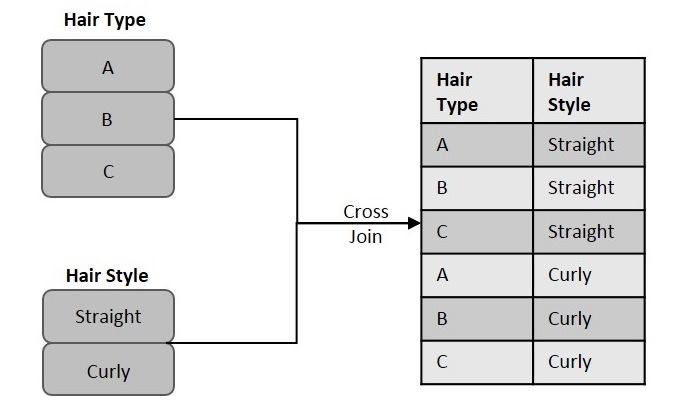
As you can see, we considered two table columns: Hair Style and Hair Type. Each of these columns contain some records that need to be matched. Hence, using cross join, we combine each record in the "Hair Style" column with all records in the "Hair Type" column. The resultant table obtained is considered as the Cartesian product or Joined table.
Syntax
Following is the basic syntax of the Cross Join query in SQL −
SELECT column_name(s)
FROM table1
CROSS JOIN table2;
Example
Assume we have created a table named CUSTOMERS, which contains the personal details of customers including their name, age, address and salary etc., using the following query −
Now, insert values into this table using the INSERT statement as follows −
The table will be created as −
| ID | NAME | AGE | ADDRESS | SALARY |
|---|---|---|---|---|
| 1 | Ramesh | 32 | Ahmedabad | 2000.00 |
| 2 | Khilan | 25 | Delhi | 1500.00 |
Let us create another table ORDERS, containing the details of orders made and the date they are made on.
Using the INSERT statement, insert values into this table as follows −
The table is displayed as follows −
| OID | DATE | CUSTOMER_ID | AMOUNT |
|---|---|---|---|
| 100 | 2009-10-08 00:00:00 | 3 | 1500.00 |
| 101 | 2009-11-20 00:00:00 | 2 | 1560.00 |
Now, if we execute the following Cross Join query on these two tables given above, the cross join combines each row in CUSTOMERS table with each row in ORDERS table.
Output
The resultant table is as follows −
| ID | NAME | AMOUNT | DATE |
|---|---|---|---|
| 2 | Khilan | 1500.00 | 2009-10-08 00:00:00 |
| 1 | Ramesh | 1560 | 2009-11-20 00:00:00 |
| 2 | Khilan | 1560 | 2009-11-20 00:00:00 |
| 1 | Ramesh | 1500.00 | 2009-10-08 00:00:00 |
Joining Multiple Tables with Cross Join
We can also join more than two tables using cross join. In this case, multiple-way permutations are displayed and the resultant table is expected to contain way more records than the individual tables.
Syntax
Following is the syntax to join multiple tables using cross join in SQL −
SELECT column_name(s)
FROM table1
CROSS JOIN table2
CROSS JOIN table3
CROSS JOIN table4
....
....
....
CROSS JOIN tableN;
Example
Assume we have created another table named ORDER_RANGE using the following query −
Now, we can insert values into this empty tables using the INSERT statement as follows −
The ORDER_RANGE table is created as follows −
| SNO | ORDER_RANGE |
|---|---|
| 1 | 1-100 |
| 2 | 100-200 |
| 3 | 200-300 |
Following query combines the three tables CUSTOMERS, ORDERS and ORDER_RANGE, using cross join −
Output
The resultant table is given below −
| ID | NAME | AMOUNT | DATE | ORDER_RANGE |
|---|---|---|---|---|
| 2 | Khilan | 1560 | 2009-11-20 00:00:00 | 1-100 |
| 1 | Ramesh | 1560 | 2009-11-20 00:00:00 | 1-100 |
| 2 | Khilan | 1500.00 | 2009-10-08 00:00:00 | 1-100 |
| 1 | Ramesh | 1500.00 | 2009-10-08 00:00:00 | 1-100 |
| 2 | Khilan | 1560 | 2009-11-20 00:00:00 | 100-200 |
| 1 | Ramesh | 1560 | 2009-11-20 00:00:00 | 100-200 |
| 2 | Khilan | 1500.00 | 2009-10-08 00:00:00 | 100-200 |
| 1 | Ramesh | 1500.00 | 2009-10-08 00:00:00 | 100-200 |
| 2 | Khilan | 1560 | 2009-11-20 00:00:00 | 200-300 |
| 1 | Ramesh | 1560 | 2009-11-20 00:00:00 | 200-300 |
| 2 | Khilan | 1500.00 | 2009-10-08 00:00:00 | 200-300 |
| 1 | Ramesh | 1500.00 | 2009-10-08 00:00:00 | 200-300 |

Comments
Post a Comment