80 HTML Table Headers and Captions
Table Headers and Captions
Headers and captions are used inside tables to organize and present data in a structured format.
The table heading is an essential part of a table, providing labels for columns. The <th> (table header) element is used to define table headings.
Captions are used in the tables to provide a title or explanation for the table. The <caption> element is placed immediately after the opening table tag.
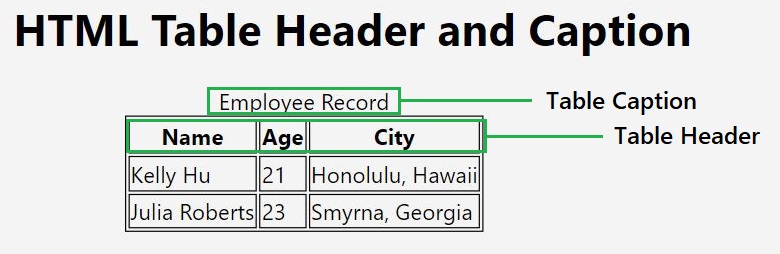
Syntax to Create Table's Header and Caption
The following is the syntax to create a header and caption for an HTML table:
<table>
<caption>Description of table</caption>
<tr>
   <th>heading 1</th>
   <th>heading 2</th>
   <th>heading 3</th>
</tr>
</table>
Define a Header Row for a Table
The <th> tag is used to represent table headings, and it is typically used within the <tr> (table row) element. Unlike the <td> (table data) tag used for regular cells, <th> is reserved for headers. In most cases, the first row of a table is designated as the header row.
Example
Consider a simple HTML table with headings for "Name" and "Salary":
Styling Table Headings
Styling table headings can enhance the visual appeal of a table. CSS can be applied to <th> elements to customize their appearance. In the following example, a simple CSS style is added to the <style> tag within the <head> section to modify the background color and text alignment of the table headings.
Example
This example demonstrates how you can style table headings with CSS:
Using Header Cells in Any Row
While it's common to use <th> in the first row of a table, you can utilize it in any row based on your requirements. This flexibility allows for the creation of complex tables with multiple header rows or headers interspersed within the table.
Example
In this example, we are creating table headers in the first row:
Table Header Using <thead> Element
The <thead> tag is used to group table header cells so that a combined CSS style can be applied to header cells.
The <thead> tag is typically placed within the <table> element and contains one or more <tr> elements, each of which, in turn, contains <th> elements representing column headers.
Example
In this example, we are creating a table header using the thead tag:
Defining Multiple Header Rows
You can include multiple <tr> elements within <thead> to create multiple header rows. This is useful when your table structure requires a more complex hierarchy of headers.
Example
In this example, we are defining two rows as the table header:
Using '<colgroup>' Inside '<thead>'
The <colgroup> tag can be used within <thead> to group together a set of column and apply CSS styling or attributes to entire columns.
Example
In this example we apply style to first two columns of table by grouping those columns in colgroup tag.
Combining with '<tfoot>' and '<tbody>'
The <thead> tag is often combined with <tfoot> (table footer) and <tbody> (table body) to create a comprehensive table structure.
Example
In the following code the structure of table separates header, body, and footer content for better organization.
Difference between <thead> and <th>
Following are the points that highlight the differences between <thead> and <th> −
- The <thead> tag is a structural element used to group header content, while <th> is a cell-level element defining a header cell.
- It's common to use <th> within <thead>, but <th> can also be used outside <thead> to define headers in regular rows.
- Including <thead> is optional; however, using it improves the semantic structure of the table.
Adding Caption to a HTML Table
The caption tag will serve as a title or explanation for the table, and it shows up at the top of the table.
Example
In the following code we will display a caption on top of a HTML table:
Table Header, Body, and Footer
Tables can be divided into three portions: a header, a body, and a foot. The head and foot are rather similar to headers and footers in a word-processed document that remain the same for every page, while the body is the main content holder of the table.
The three elements for separating the head, body, and foot of a table are −
- The <thead> tag to create a separate table header.
- The <tbody> tag to indicate the main body of the table.
- The <tfoot> tag to create a separate table footer.
A table may contain several <tbody> elements to indicate different pages or groups of data. But it is notable that <thead> and <tfoot> tags should appear before <tbody>
Example
In this example, we are creating an HTML table with the table header, body, and footer:

Comments
Post a Comment