114 Java - SortedMap Interface

Several methods throw a NoSuchElementException when no items are in the invoking map. A ClassCastException is thrown when an object is incompatible with the elements in a map. A NullPointerException is thrown if an attempt is made to use a null object when null is not allowed in the map.
SortedMap Interface Methods
The methods declared by SortedMap are summarized in the following table −
| Sr.No. | Method & Description |
|---|---|
| 1 | Comparator comparator( ) Returns the invoking sorted map's comparator. If the natural ordering is used for the invoking map, null is returned. |
| 2 | Object firstKey( ) Returns the first key in the invoking map. |
| 3 | SortedMap headMap(Object end) Returns a sorted map for those map entries with keys that are less than end. |
| 4 | Object lastKey( ) Returns the last key in the invoking map. |
| 5 | SortedMap subMap(Object start, Object end) Returns a map containing those entries with keys that are greater than or equal to start and less than end. |
| 6 | SortedMap tailMap(Object start) Returns a map containing those entries with keys that are greater than or equal to start. |
Hierarchy of SortedMap Interface
The following diagram shows the hierarchy of SortedMap Interface in Java -
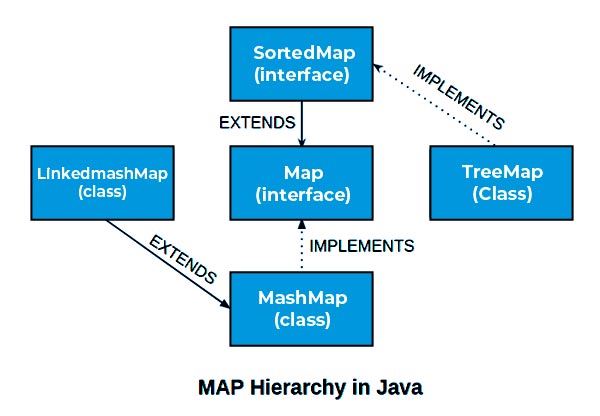
Operations on SortedMap Interface
Creating a SortedMap
TreeMap class implements the SortedMap interface. We can use the TreeMap constructor to create a SortedMap instance.
Syntax
Following is the syntax to create a sortemap instance:
// Create a sorted map
SortedMap<String, Double> map = new TreeMap<>();
Here we're creating a sorted map of String vs Double values. This map will store the keys based on alphanumeric order.
Adding Value to a SortedMap
SortedMap provides the put() method, which can be used to add value to a sortedmap instance. Whenever a value is added to the map, the map automatically sorts itself based on the keys entered.
Syntax
public V put(K key,V value)
Where the Key-Value pair represents the key and value associated with each other and are stored in the map. If this key is already associated with a value then that value is returned and the new value is associated with the key otherwise a null value is returned.
Example
// Put elements to the map
map.put("Zara", Double.valueOf(3434.34));
map.put("Mahnaz", Double.valueOf(123.22));
map.put("Ayan", Double.valueOf(1378.00));
map.put("Daisy", Double.valueOf(99.22));
map.put("Qadir", Double.valueOf(-19.08));
Getting value from a SortedMap
Using the get(key) method, we can retrieve the value associated with a key.
Syntax
public V get(Object key)
If the key is not present in the map, then it will return null otherwise it will return the associated value with the key provided.
Example
Double value = map.get("Qadir");
System.out.print("Qadir: " + value);
Updating value of a SortedMap
We can update an existing value of a sortedmap by calling the put() method again with the same key. Being a sortedmap, the entries will be sorted again based on the sorting order of the newly entered key(s).
Example
// Put elements to the map
map.put("Zara", Double.valueOf(3434.34));
map.put("Mahnaz", Double.valueOf(123.22));
map.put("Zara", Double.valueOf(1378.00));
SortedMap will consider the latest put() method call to update the entry with same key.
Deleting a value from a sortedmap
Using remove(key) method, we can remove the key, value associated with a key.
Syntax
public V remove(Object key)
If key is not present in the map, then it will return null otherwise it will remove key-value association from the map and sort the map accordingly.
Example
Double value = map.remove("Qadir");
System.out.print("Qadir removed with value: " + value);
Iterating sortedMap
SortedMap entries can be easily navigated. SortedMap provided a method entrySet() which provides all the entries in form of set.
Syntax
public Set<Map.Entry<K,V>> entrySet()
Where Map.Entry contains the key-value pair to be iterated.
Example
// Get a set of the entries
Set<Map.Entry<String, Double>> set = map.entrySet();

// Get an iterator
Iterator<Map.Entry<String, Double>> i = set.iterator();

// Display elements
while(i.hasNext()) {
 Map.Entry<String, Double> me = i.next();
 System.out.println(me.getKey());
}
Examples of SortedMap Interface
Example 1
Following is an example showing how TreeMap can be used to get values of a SortedMap −
Output
Ayan: 1378.0
Daisy: 99.22
Mahnaz: 123.22
Qadir: -19.08
Zara: 3434.34
Example 2
Following is an example showing how TreeMap can be used to set values of a SortedMap −
Output
Ayan: 13780.0
Daisy: 992.2
Mahnaz: 1232.2
Qadir: -190.79999999999998
Zara: 34343.4
Example 3
Following is an example showing how a TreeMap can be used to get key of a sortedMap entry −
Output
Ayan
Daisy
Mahnaz
Qadir
Zara
Advantages of SortedMap Interface
- SortedMap ensures that the map is always sorted in ascending order of the keys. Whenever a key-value pair is added to the sortedmap, it is re-sorted
- Being sorted, sortedmap is very efficient in searches. In the case of large read-only datasets, sortedmap is an ideal choice to be implemented.
- We can customize the sorting mechanism by using a comparator on the key type.
Disadvantages of SortedMap Interface
- As a sortedmap has to be sorted every time an entry is added or changed, it becomes a performance bottleneck where changes are very frequent. In such cases, sortedmap is not preferred.
- As sortedMap maintains sort ability based on key, a key should be comparable and thus we cannot use a custom key if it is not implementing the comparable interface.

Comments
Post a Comment