58 SQL - INTERSECT

In real-time scenarios, there will be a huge number of tables in a database that contains information. The user may find it challenging to gather common information from various tables. So we use the INTERSECT operator to accomplish that. It helps to retrieve the common data from various tables.
The SQL INTERSECT Operator
The INTERSECT operator in SQL is used to retrieve the records that are identical/common between the result sets of two or more tables.
Let us consider the below tables as an example to get a better understanding −
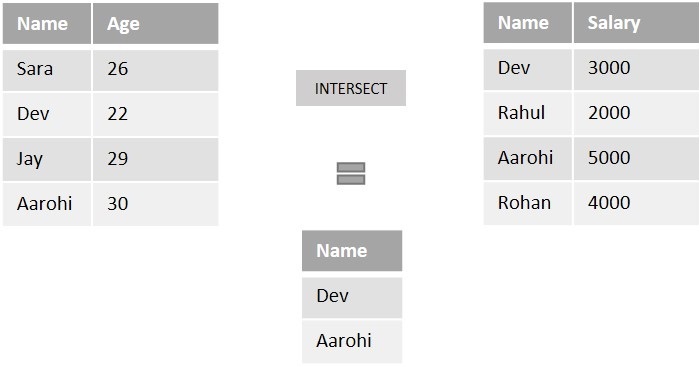
If we perform the intersection operation on both tables described above using the INTERSECT operator, it returns the common records which are Dev and Aarohi.
Syntax
Following is the SQL syntax of INTERSECT operator in Microsoft SQL Server −
SELECT column1, column2,..., columnN
FROM table1, table2,..., tableN
INTERSECT
SELECT column1, column2,..., columnN
FROM table1, table2,..., tableN
Example
First of all, let us create a table named STUDENTS using the following query −
Let's insert some values into the table using the following query −
The table produced is as shown below −
| ID | NAME | SUBJECT | AGE | HOBBY |
|---|---|---|---|---|
| 1 | Naina | Mathematics | 24 | Cricket |
| 2 | Varun | Physics | 26 | Football |
| 3 | Dev | Mathematics | 23 | Cricket |
| 4 | Priya | Physics | 25 | Cricket |
| 5 | Adithya | Chemistry | 21 | Cricket |
| 6 | Kalyan | Mathematics | 30 | Football |
Now, let us create another table named STUDENTS_HOBBY using the following query −
Once the table is created, let us insert some values to the table using the query below −
The table created is as follows −
| ID | NAME | HOBBY | AGE |
|---|---|---|---|
| 1 | Vijay | Cricket | 18 |
| 2 | Varun | Football | 26 |
| 3 | Surya | Cricket | 19 |
| 4 | Karthik | Cricket | 25 |
| 5 | Sunny | Football | 26 |
| 6 | Dev | Cricket | 23 |
Now, we are retrieving the common records from both the tables using the following query −
Output
When we execute the above query, the output is obtained as follows −
| NAME | AGE | HOBBY |
|---|---|---|
| Dev | 23 | Cricket |
| Varun | 26 | Football |
INTERSECT with BETWEEN Operator
We can use the INTERSECT operator with the BETWEEN operator in SQL to find records that fall within a specified range.
Example
Now, let us retrieve the name, age, and hobby of students aged between 25 and 30 from both the 'STUDENTS' and 'STUDENTS_HOBBY' tables, returning only the common rows within the specified age range −
Output
The output for the above query is produced as given below −
| NAME | AGE | HOBBY |
|---|---|---|
| Varun | 26 | Football |
INTERSECT with IN Operator
We can also use the INTERSECT operator with the IN operator in SQL to find the common records that exists in the specified list of values. The IN operator is used to filter a result set based on a list of specified values.
Example
The following SQL query returns the name, age, and hobby of students who have 'Cricket' as their hobby in both 'STUDENTS' and 'STUDENTS_HOBBY' tables −
Output
When we execute the above query, the output is obtained as follows −
| NAME | AGE | HOBBY |
|---|---|---|
| Dev | 23 | Cricket |
INTERSECT with LIKE Operator
The LIKE operator is used to perform pattern matching on a string. The INTERSECT operator can also be used with the LIKE operator in SQL to find the common rows that matches with the specified pattern.
Example
The query below retrieves the names that start with 'V' using the wildcard '%' in the LIKE operator from the common names of both tables −
Output
The output for the above query is produced as given below −
| NAME | AGE | HOBBY |
|---|---|---|
| Varun | 26 | Football |
Comments
Post a Comment